


Last month I made the switch from my Blackberry (Tour) to an Android (Droid 2) phone. One of the things that I'm loving about the Android platform is the great selection of photo and image related apps available for it.
Here are some of my favorite:
FXCamera
 A great photography app with some really great effects such as:
Adobe Photoshop Express
 I've used Photoshop for years (since I studied graphic design back in the mid-90's anyway). While this is not the most full-featured image-editor out there, it is a great one, and it's FREE!
Editing with Photoshop Express is extremely intuitive...simply drag your finger to crop, adjust color, apply effects — you name it.
 The Pièce de résistance of Android photography apps.
While it's not a freebie (you get what you pay for), it is hands down the most useful, and full-featured Android photography app (as of this writing).
Here are some of my favorite:
FXCamera

- ToyCam - a Toy Camera Emulator
- Polandroid - a 1970's Polaroid Camera Emulator
- Fisheye - a Fisheye Lens Emulator
- SymmetriCam - a Mirror/SymmetriCam (my personal favorite)
- Warhol - a Pop Culture Cam that produces Andy Warhol-like pics.
- Normal Cam - a Basic Camera with sepia, b/w, and saturation filters.
Adobe Photoshop Express
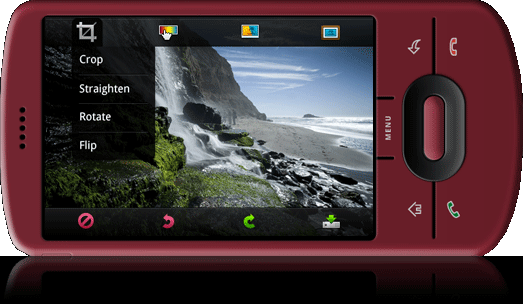
Editing with Photoshop Express is extremely intuitive...simply drag your finger to crop, adjust color, apply effects — you name it.
- Crop, rotate, and color-correct...this is my favorite part of the app.
- Add soft focus, sepia tint, or change to black & white quickly.
- Browse your photoshop.com account using the Photo Browser.
- Add one-touch other effects like Warm Vintage and Vignette.
- Oh yeah...did I mention it's FREE.

While it's not a freebie (you get what you pay for), it is hands down the most useful, and full-featured Android photography app (as of this writing).
- 40 photo fx as of the most recent release. (fisheye, mirror, greenscreen, and tons more)
- Fully customizable button set up.
- Burst shooting (really cool feature).
- Photobooth feature (shoot a 2x2 image without cropping).
- One click uploading to Twitter, Facebook, etc...
- Customizable grid overlays for perfect shot composition.
- The list goes on and on...a must have app for anyone wanting a great camera app!

